Input / Output
In STARK meshes are ordinary C++ containers, frames are written as VTK files, and solver diagnostics are printed both to the console and to yaml log files. This makes it easy to combine STARK with external mesh generation and pre/post processing tools. VTK Files can directly be inspected on ParaView and Blender and logs are easily parsed by Python scripts.
A typical simulation produces three kinds of output:
Output |
Purpose |
Typical file |
|---|---|---|
VTK frames |
Geometry data |
|
Text log |
Human-readable copy of console/file output |
|
YAML log |
Machine-readable solver statistics and timings |
|
The output directory, simulation name, frame rate, and verbosity are configured through stark::Settings.
stark::Settings settings;
settings.output.simulation_name   = "my_sim";
settings.output.output_directory  = "build/output/my_sim";
settings.output.codegen_directory = "build/codegen";
settings.output.fps               = 30;
settings.output.console_verbosity = symx::Verbosity::Summary;
settings.output.file_verbosity    = symx::Verbosity::Full;

stark::Simulation simulation(settings);
simulation_name, output_directory, and codegen_directory must be set. STARK creates the directories automatically. The code-generation directory is used by SymX to cache generated/compiled kernels; it is not where frame files are written.
Mesh input
STARK does not require a special mesh class at the API boundary. Most geometry is represented as
std::vector<Eigen::Vector3d> vertices;
std::vector<std::array<int, N>> connectivity;
where N = 1 for points, N = 2 for segments, N = 3 for triangles, and N = 4 for tetrahedra. This means you can bring meshes from your own meshing code, external tools, procedural generators, or the helper functions bundled with STARK.
Loading VTK meshes
STARK bundles vtkio, which can read a VTK file into the usual vertex/connectivity containers.
#include <vtkio>

std::vector<Eigen::Vector3d> vertices;
std::vector<std::array<int, 4>> tets;

vtkio::VTKFile vtk_file;
vtk_file.read("bunny.vtk");
vtk_file.get_points_to_twice_indexable(vertices);
vtk_file.get_cells_to_twice_indexable(tets);
For the common case, STARK also provides load_vtk wrappers:
stark::Mesh<4> tet_mesh = stark::load_vtk<4>("bunny.vtk");
Loading OBJ triangle meshes
Triangle OBJ meshes can be loaded with:
std::vector<stark::Mesh<3>> meshes = stark::load_obj("model.obj");
The OBJ loader expects triangular faces. If the file contains multiple OBJ shapes, the return value contains one stark::Mesh<3> per shape.
Procedural mesh generators
For examples, tests, and simple scenes, STARK provides a few built-in mesh generators:
auto sphere = stark::make_sphere(0.5);
auto box    = stark::make_box({1.0, 0.5, 0.2});
auto cyl    = stark::make_cylinder(0.2, 1.0);
auto torus  = stark::make_torus(1.0, 0.1);

auto cloth = stark::generate_triangle_grid(
    Eigen::Vector2d{0.0, 0.0},   // center
    Eigen::Vector2d{1.0, 1.0},   // dimensions
    std::array<int, 2>{32, 32},  // quads per dimension
    0.0                          // z coordinate
);

auto block = stark::generate_tet_grid(
    Eigen::Vector3d{0.0, 0.0, 0.0},
    Eigen::Vector3d{1.0, 1.0, 1.0},
    std::array<int, 3>{10, 10, 10}
);
Presets and Handles
The highest-level option is presets, which generate geometry, register physics, and return mesh data and handles.
stark::Volume::Params material = stark::Volume::Params::Soft_Rubber();

auto [V, T, H] = simulation.presets->deformables->add_volume_grid(
    "block",
    Eigen::Vector3d{1.0, 1.0, 1.0},  // size
    std::array<int, 3>{8, 8, 8},     // subdivisions
    material
);
As a preset, add_volume_grid returns the mesh data and a set of handles associated with the standard elastic volume model:
std::vector<Eigen::Vector3d>containing the mesh verticesstd::vector<std::array<int, 4>>containing the tetrahedral connectivitystark::Volume::Handler: handle to the volume object which in turn containsstark::PointSetHandler: handle to the vertex representation of the objectstark::EnergyLumpedInertia::Handler: handle to the inertia termstark::EnergyTetStrain::Handler: handle to the strain energy termstark::ContactHandler: handle to the contact representation
Handlers provide convenient interfaces to modify object definitions. For instance, you can move all the vertices of the “block” object by
H.point_set.add_displacement({0.0, 0.0, 1.0});
More on modelling with STARK in the upcoming “Physical Models” chapter.
Writing VTK files
STARK writes frame geometry in VTK format. It will write meshes automatically every frame as you would expect. Further, the built in helpers if you want to write your own geometry:
stark::write_VTK("points.vtk",   vertices, points);
stark::write_VTK("edges.vtk",    vertices, edges);
stark::write_VTK("surface.vtk",  vertices, triangles);
stark::write_VTK("volume.vtk",   vertices, tets);

// Triangle meshes can optionally include generated vertex normals.
stark::write_VTK("surface_with_normals.vtk", vertices, triangles, true);
Or use vtkio directly:
vtkio::VTKFile vtk_file;
vtk_file.set_points_from_twice_indexable(vertices);
vtk_file.set_cells_from_twice_indexable(tets, vtkio::CellType::Tetra);
vtk_file.write("frame_0000.vtk");
Registering simulation output
Most STARK systems expose output helpers that register geometry to be written every frame. For deformables, typical calls look like this:
simulation.deformables->output->add_tet_mesh("tets", nodeset, tets);
simulation.deformables->output->add_triangle_mesh("surface", nodeset, triangles, tri_tet_map);
simulation.deformables->output->add_segment_mesh("edges", nodeset, edges, edge_tet_map);
simulation.deformables->output->add_point_set("points", nodeset);
The name passed to the output helper becomes part of the filename. Internally, frame paths are generated as
<output_directory>/<simulation_name>_<name>_<frame>.vtk
Frame writing is controlled by:
Setting |
Meaning |
|---|---|
|
Enables/disables frame file output. |
|
Output frame rate. |
Custom per-frame output callbacks
The frame writer is callback-based. STARK’s built-in output systems use the same mechanism: register a function that is executed whenever a frame is written.
stark.callbacks->add_write_frame([&]() {
    const std::string path = stark.get_frame_path("debug_surface") + ".vtk";
    stark::write_VTK(path, debug_vertices, debug_triangles, true);
});
Visualizing VTK output
Blender
For rendering and animation, VTK sequences can be imported into Blender with the Blender Sequence Loader add-on. The add-on loads mesh sequences just-in-time as the Blender frame changes, which avoids loading the full simulation into memory at once. It supports common geometric data such as points, lines, triangles, quads, and can extract surface meshes from tetrahedral or hexahedral volume meshes.
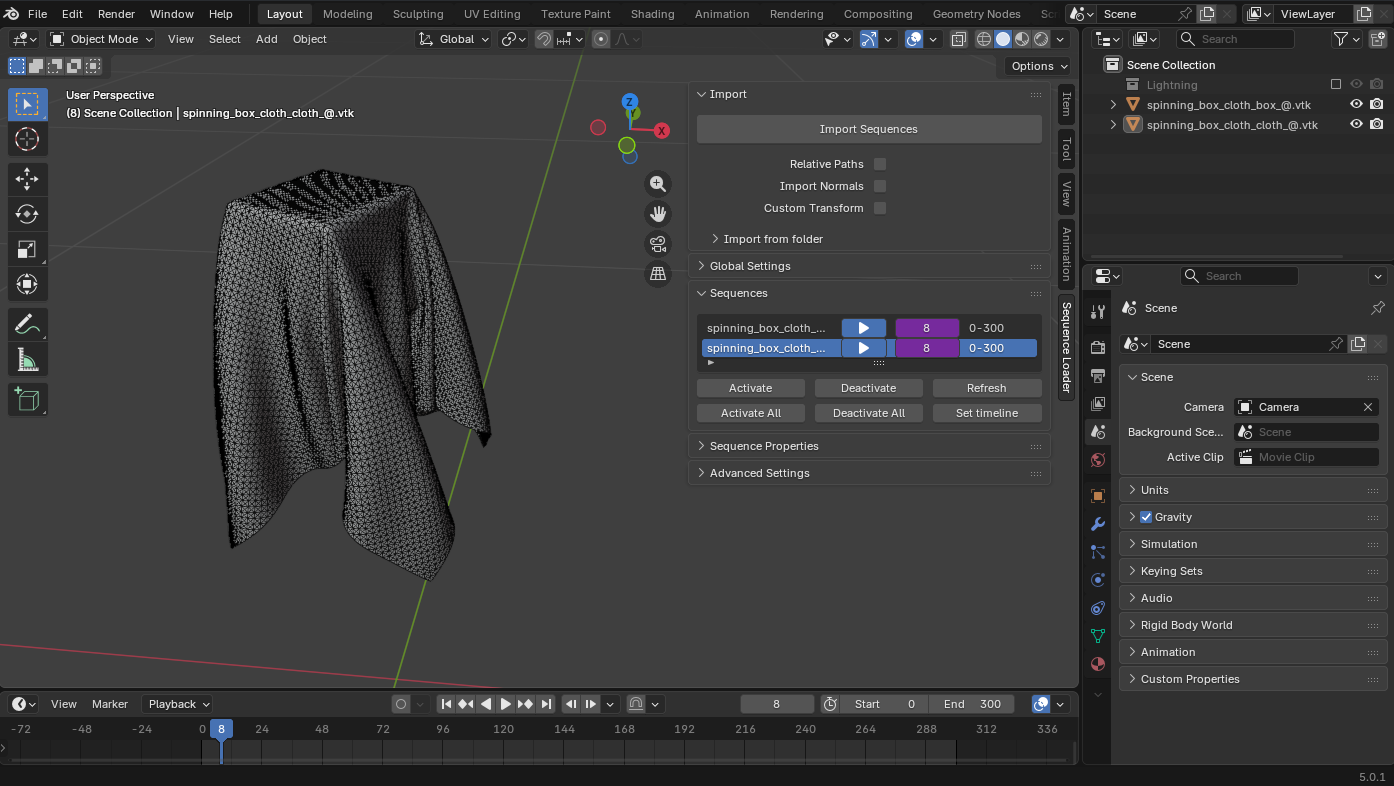
STARK frame sequence loaded in Blender with Sequence Loader.
ParaView
Sequences can also be viewed with ParaView. Open one of the generated .vtk files, or open the file sequence if the filenames share the same prefix and increasing frame index.
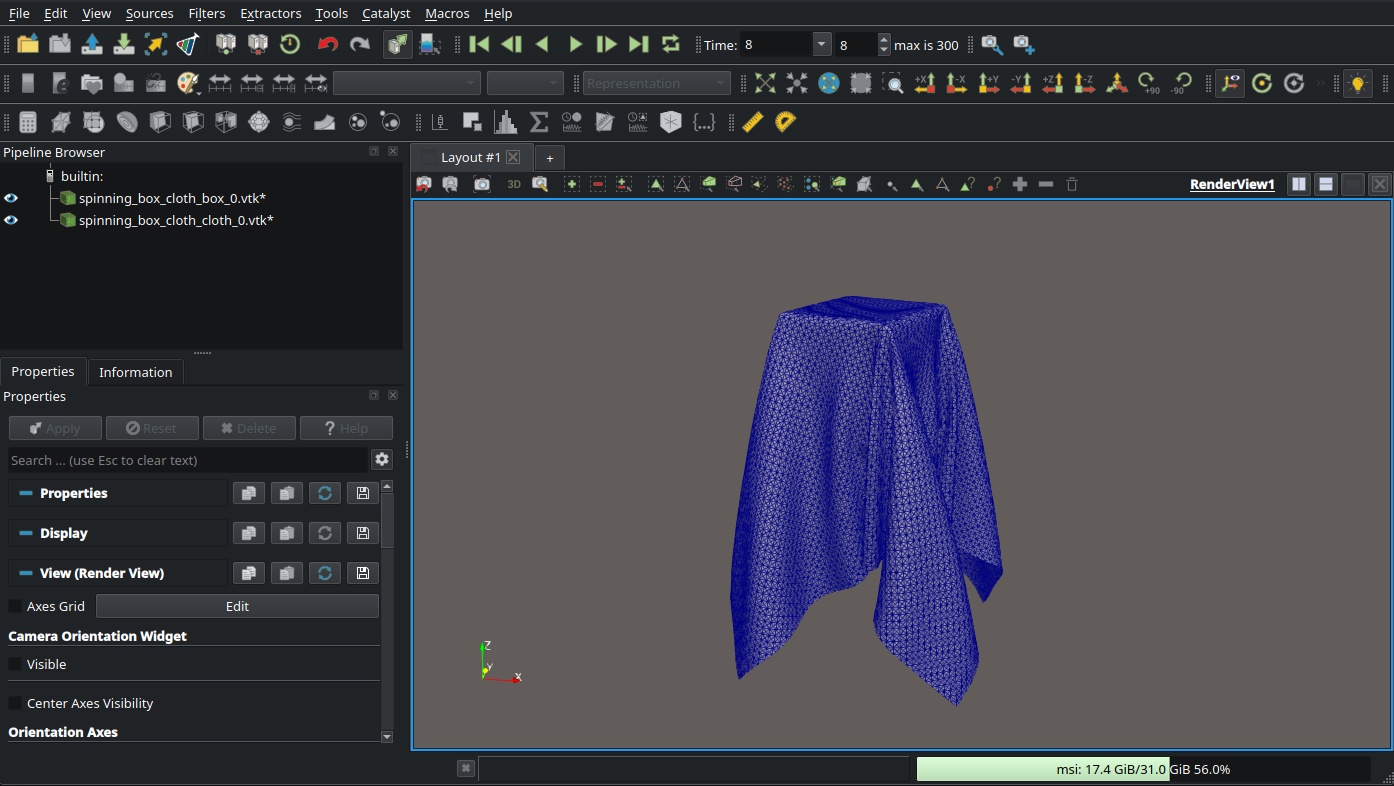
STARK frame sequence visualized in ParaView.
Console output
A normal STARK run prints four main sections: settings, SymX compilation/loading, simulation progress, and final summary.
Settings header
At startup, STARK prints the effective settings used by the run. The following is a representative selection:
================================== Settings ==============================
Stark Settings
     Output
         simulation_name: "spinning_box_cloth"
         output_directory: ".../build/output/spinning_box_cloth"
         codegen_directory: ".../build/codegen"
         fps: 30
         console_verbosity: Summary
         file_verbosity: Full
     Simulation
         gravity: (0.000000, 0.000000, -9.810000)
         max_time_step_size: 3.3333e-02
         use_adaptive_time_step: true
     Newton's Method
         projection_mode: Progressive
         solver: BDPCG
     Execution
         end_frame: 2147483647
         n_threads: 10
SymX section
The SymX section reports generated symbolic kernels and compilation/cache status.
==================================== SymX ================================
Second Order Potentials:
    EnergyBendingFlat...............................................loaded
    EnergyLumpedInertia.............................................loaded
    EnergyTetStrain.................................................loaded
    contact_d_d_pt_pt_cubic.........................queued for compilation
    friction_d_d_pt_C0..............................................loaded
Compiling... done.
Total time: 0.712316 s

Degrees of freedom:
soft.v1: 3267
rigid.v1: 3
rigid.w1: 3
Total: 3273
Simulation section
The STARK section prints frame markers and one line per solved time step.
The following corresponds to symx::Verbosity::Summary:
==================================== STARK ===============================
[Frame: 0] Time: 0.000 s
    0. dt: 33.33 ms | #newton:  3 | ph:  0.0% | #CG/newton:   43 | ls (cap|max|inv|bt):  0| 0| 0| 0| runtime:   12.7 ms | cr:    0.4
[Frame: 1] Time: 0.067 s
    1. dt: 33.33 ms | #newton:  8 | ph: 37.9% | #CG/newton:  162 | ls (cap|max|inv|bt):  0| 0| 0| 1| runtime:   80.6 ms | cr:    2.4
The main fields are:
Field |
Meaning |
|---|---|
|
Current simulation time step. |
|
Newton iterations used for this time step. |
|
Percentage of Hessian blocks projected to positive definite during the solve. |
|
Average linear-solver iterations per Newton iteration. |
|
Line-search counters: step cap reductions, maximum-step reductions, invalid-state rejections, and Armijo backtracking reductions. |
|
Wall-clock time for the time-step solve. |
|
Compute ratio: |
Contact simulations may also print corrective events, for example:
Penetration couldn't be avoided. Contact stiffness hardened from 1.0e+05 to 2.0e+05.
This indicates that STARK detected a failed contact validity condition and increased the offending contact stiffness before retrying.
YAML log structure
The YAML log is the machine-readable companion to the console output. It is written periodically during the run and once more at the end. Its top-level structure is:
accumulators:
  time_steps: 301
  avg dt: 0.03333333
  failed_steps: 0.170669
  newton_iterations: 3636
  cg_iterations: 348569
  ls_inv: 563
  ls_bt: 1633
  projected_hessians_ratio: 245.7605

timers:
  linear_system_solve:
    total: 16.078993
    count: 8154
    avg: 0.001972
    min: 0.000054
    max: 0.011288
  assembly:
    total: 3.024711
    count: 11936
    avg: 0.000253
    min: 0.000005
    max: 0.003527

statistics:
  dt:
    total: 10.03333
    avg: 0.03333333
    min: 0.03333333
    max: 0.03333333
    count: 301
  newton_iterations:
    total: 3636
    avg: 11.882353
    min: 3
    max: 49
    count: 306

series:
  time: [0.03333333, 0.06666667, 0.1, ...]
  frame: [1, 1, 2, ...]
  dt: [0.03333333, 0.03333333, 0.03333333, ...]
  newton_iterations: [3, 7, 8, ...]
The sections have different purposes:
Section |
Purpose |
|---|---|
|
Totals or last accumulated values over the full run. |
|
Runtime measurements for named code regions. Each timer stores total time, call count, average, minimum, and maximum. |
|
Aggregated statistics for scalar quantities such as |
|
Per-step time series useful for plotting convergence, time-step changes, or solver cost over time. |
Final summary
At the end of the run, STARK prints a compact summary of the simulation, solve statistics, and runtime breakdown.
================================== Summary ===============================
Info
  Name:               spinning_box_cloth
  Simulation time:    10.033 s
  ndofs:              3273
  Frames:             301
  Time steps:         301
  dt [ms]:            avg: 33.3 | min: 33.3 | max: 33.3

  Solve                         Total      Avg      Min      Max
  --------------------------------------------------------------
  Newton iterations              3636     11.9        3       49
  CG iterations                348569     92.2        1      275
  Line search inv                 563      0.2        0        8
  Line search bt                 1633      0.4        0        6
  Projected hessians                       6.5%     0.0%    99.0%

  Runtime                                    Time (s)       %
  ------------------------------------------------------------
  linear_system_solve                       16.078993   46.6%
  before_energy_evaluation                   8.025052   23.3%
  evaluate_P_grad_hess                       3.035306    8.8%
  assembly                                   3.024711    8.8%
  project_to_PD                              1.711081    5.0%
  write_frame                                0.129421    0.4%
  ------------------------------------------------------------
  Total                                     34.473580  100.0%
Practical notes
Keep
codegen_directorypersistent between runs to benefit from SymX kernel caching.Use
console_verbosity = Summaryfor normal runs and higher verbosity when debugging.Use the
.yamllog for plots and comparisons instead of scraping console output.Disable frame writes for timing benchmarks unless visualization output is part of what you want to measure.